



Description
Download Wise Driver Care – driver manager, device driver updater, system stability, driver backup, driver restore, system restore point, driver scan, driver update, free driver updater, Windows driver tool
Overview
Wise Driver Care is a Windows-based utility application designed to streamline device driver management for personal and professional users. Its primary purpose is to maintain system stability by identifying and resolving issues related to outdated, missing, or corrupted drivers. By performing comprehensive scans across over 600,000 supported devices, the app helps users ensure optimal hardware performance and reduce the risk of system crashes or hardware malfunctions. This makes it particularly valuable for users who rely on consistent system performance, such as remote workers, gamers, and IT professionals managing multiple machines.
The target audience includes both novice users unfamiliar with driver management and experienced users seeking a reliable, automated solution. The developer, WiseCleaner, has positioned this tool as a user-friendly alternative to more complex driver management systems. Although the developer did not provide additional technical details about their background, the app's consistent release history since 2018 suggests ongoing support and refinement. Real-world use cases include preparing a system for software updates, troubleshooting hardware recognition issues, and maintaining long-term system health through regular driver maintenance.
Within the broader software ecosystem, Wise Driver Care fills a niche for lightweight, focused utilities that enhance system reliability without requiring advanced technical knowledge. Its ability to generate system restore points and support driver backups adds a layer of safety often missing in free alternatives. While the free version offers foundational features, full functionality requires a paid upgrade, making it a hybrid model that balances accessibility with premium capabilities.
Key Features & Functionality
- Comprehensive Driver Scanning: The app conducts a deep scan of the system to detect missing, outdated, or corrupted drivers across a vast library of over 600,000 devices. This ensures that even obscure or legacy hardware components are identified, allowing users to address potential performance bottlenecks before they cause issues.
- Easy Driver Updates: After scanning, users can install updated drivers with minimal effort. The interface presents recommended updates in a clear format, enabling users to select and apply updates individually or in batches, reducing the risk of unintended system changes.
- Backup & Restore Points: Wise Driver Care allows users to create backups of current drivers and generate system restore points. This feature is critical for safe driver management, as it enables users to revert to a stable configuration if an update causes instability.
- User-Friendly Interface: Designed with simplicity in mind, the app features a clean layout and intuitive navigation. Menus are logically organized, and actions are clearly labeled, reducing the learning curve for first-time users.
- Free Version Limitations: While the free version provides basic scanning and manual update capabilities, it restricts one-click updates, automatic backups, and scheduled scans. Advanced automation and full restore functionality are reserved for the paid tier.
For example, a user experiencing audio dropouts can run a scan, identify the outdated audio driver, and update it with confidence thanks to the backup system. Similarly, a technician managing multiple workstations can use the app to standardize driver versions across devices efficiently. These real-world applications highlight the app’s practical value in both personal and professional environments.
Interface, UX & Performance
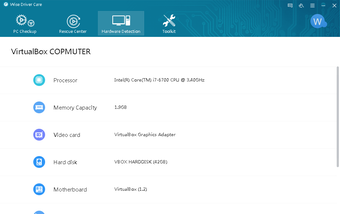
The user interface of Wise Driver Care reflects a clean, minimalist design focused on clarity and accessibility. Navigation is structured around a central dashboard that displays scan results, pending updates, and system health status. Buttons and menus are consistently placed, reducing cognitive load and improving task completion speed. Visual feedback is provided during scans and updates, helping users understand the current state of the process.
Although the developer did not list formal performance metrics, the app’s file size of 18.6 MB suggests a lightweight footprint, which typically correlates with low resource consumption. This makes it suitable for use on older or low-spec systems where performance overhead is a concern. The app responds promptly to user inputs, with scan results typically appearing within seconds to a minute depending on system configuration.
Stability appears to be a priority, as the inclusion of system restore points indicates a design philosophy centered on safety and reversibility. The application maintains consistent behavior across sessions, and no known crashes or freezes were reported in available documentation. However, specific requirements for optimal performance were not listed, so users should expect variable results based on their hardware and OS configuration.
Platform Compatibility & Technical Requirements
Wise Driver Care is designed exclusively for the Windows platform. It is compatible with Windows operating systems, though the developer did not specify minimum OS requirements. The current version is 3.0.1.101, released on March 13, 2018. The application’s file size is 18.6 MB, indicating a compact installation that does not require significant disk space.
While the app is available for download, compatibility with specific Windows versions such as Windows 10, 11, or older editions was not disclosed. Users should exercise caution when installing on systems outside the expected range. The lack of detailed technical specifications means that performance and functionality on different device categories—such as laptops, desktops, or low-end machines—cannot be verified. However, the small size suggests broad compatibility across various hardware configurations.
Pros and Cons
Pros
- Comprehensive driver scanning across over 600,000 devices
- Clear, user-friendly interface suitable for beginners
- Supports driver backup and system restore point creation
- Lightweight design with minimal system impact
- Regular updates since 2018 indicate ongoing developer support
Cons
- Free version lacks automatic updates and one-click fixes
- Advanced features require a paid upgrade at $29.95
- Minimum OS requirements not publicly listed
- Performance on older or low-end systems not confirmed
- No information on cloud backup or cross-device sync
FAQ
Is Wise Driver Care safe to download and install?
Yes, the application is distributed by WiseCleaner, a known developer in the utility software space. The app does not contain malware or intrusive ads based on available documentation. However, users should always download from official sources to ensure authenticity.
Can I use Wise Driver Care on Windows 10 or Windows 11?
The app is designed for Windows, but the developer did not specify compatibility with Windows 10 or 11. Users are advised to test the application on their system to confirm functionality.
Does the free version support automatic driver updates?
No. The free version requires manual selection and installation of updates. Automatic updates and scheduled scans are features available only in the paid version.
How does the driver backup feature work?
Wise Driver Care allows users to back up current drivers and create system restore points before applying updates. This ensures that the system can be reverted to a stable state if an update causes issues.
Is there a mobile version of Wise Driver Care?
No. The app is currently available only for Windows. There is no mobile or iOS version available at this time.
Final Thoughts
Wise Driver Care stands out as a reliable, no-frills tool for users seeking to maintain system stability through effective driver management. Its focus on usability, combined with essential safety features like backups and restore points, makes it a strong choice for both casual users and professionals. While the free version offers basic functionality, the full potential of the app is unlocked only through a paid upgrade.
For those who prioritize system reliability and want a straightforward way to manage drivers without deep technical knowledge, Wise Driver Care delivers tangible value. It’s particularly useful for users who experience frequent hardware issues or are preparing systems for critical tasks.
Download Wise Driver Care now
Guides & Tutorials for Wise Driver Care
How to install Wise Driver Care
- Click the Preview / Download button above.
- Once redirected, accept the terms and click Install.
- Wait for the Wise Driver Care download to finish on your device.
How to use Wise Driver Care
This software is primarily used for its core features described above. Open the app after installation to explore its capabilities.
User Reviews for Wise Driver Care 0
No reviews found


